

Security
Feel safe. It’s all built in.
The usual doors start closed, password guessers get locked out, and one button keeps everything updated.
This page says what PasteTheme does for your site’s security, where it stops, and how to tell us about a flaw.
What PasteTheme does
Locked from day 1.
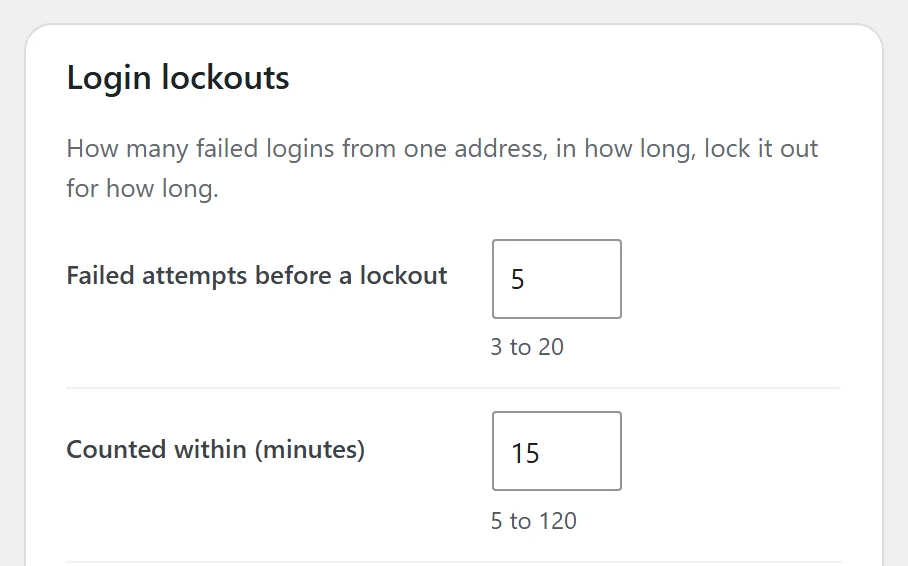
5 wrong passwords and that address is locked out. You pick how many, and for how long.
9 in 10 WordPress security holes found in 2025 were in plugins. Every job PasteTheme does itself is one less plugin to patch.
Everything on this page comes with PasteTheme Plugin, on every site; two-step login uses WordPress’s own plugin.
The usual doors start closed.
The public user list, the file editor and the old remote-access door start closed. A wrong login is never told which half was wrong.
Password guessers get locked out.
5 wrong passwords and that address is locked out. One tick sends you an email when it happens.
A daily file check.
Switch it on, and once a day PasteTheme holds WordPress’s own files and your plugins against the checksums WordPress publishes for them. It emails you the day a file that doesn’t belong turns up.
One button keeps everything updated.
WordPress, your plugins and your themes update on their own, security fixes included.
Two-step login, one click away.
With WordPress’s own plugin: an authenticator app, email codes and backup codes. The card names every administrator who has not switched it on.
Your AI gets its own key.
Your AI gets its own key from WordPress, Safe mode keeps it to words and pictures, and a log shows every call it made.
Also on every site
- Pasted code is cleaned, with a note of what came out.
- On most hosts, one button stops files in your uploads from running as code.
- An email the moment someone is made an administrator or a new app key is added.
- Every AI and app key in one list, each one a click from Revoke.
- A login for your client that changes every word and picture, and nothing else.
- Spam traps on every form, with no puzzles for visitors.
- 18 plain checks before you go live, each saying the one thing to fix.
Where it stops: not a firewall or a malware scanner. Your host handles those, and backups.
Report a flaw
Found a flaw? Tell us first.
Email info@pastetheme.com. We answer within two business days.
It is read by the people who write PasteTheme, at Chattanooga Tshirt in Tennessee. This covers PasteTheme (the theme), PasteTheme Plugin, PasteTheme Plugin Pro and this website.
What to send
- What you found, in a sentence or two.
- Where: the plugin, the theme, Pro or this website, and the version.
- The steps that show it, on a site of your own.
- The name you want the credit under.
What we ask
- Keep it between us until the fix is out.
- Test on your own site, never on someone else’s.
- Leave other people’s data unread and unchanged.
- Keep every site up: no floods, no lockout tests on a live site.
A bug that is not about security? Report a problem is the quicker way.
What happens next
Every report, the same way.
We answer.
Within two business days a person tells you we have it, and asks for anything we still need.
We fix it.
We reproduce it, fix the cause, and send the fix out as a normal WordPress update to every site with an active license. A flaw someone is already using comes before everything else.
You get the credit.
Your name, or the one you choose, goes in the changelog beside the fix. Say so if you’d rather stay unnamed. We thank by name, not with a bounty.
We publish it.
Once the fix is out, its entry on What’s new says what it was and which versions it touched, labeled Security.
The checks
Checked before every release.
Before a version goes out, its zips are run through the checks below. The run writes this table. Nobody types it.
| What | Version | Check | PHP 8.0 to 8.4 |
|---|---|---|---|
| PasteTheme Plugin | 0.26.0 | Plugin Check: 0 errors, 2 warnings* | 0 errors |
| PasteTheme Plugin Pro | 0.29.2 | Plugin Check: 0 errors, 0 warnings | 0 errors |
| Paste theme | 0.9.0 | Theme Check: 0 errors, 0 warnings | 0 errors |
Checked 13 October 2026 with Plugin Check 2.1.0 and Theme Check 20260901, the free checks WordPress publishes for plugins and themes, on the zips we build for release.
* Not counted for the PasteTheme Plugin: 2 findings under rules written for plugins and themes in the WordPress public directory (error: the plugin gets its updates from our store, not from the public directory; warning: the plugin can switch on WordPress's own automatic updates).
PHP 8.0 to 8.4: 0 errors in our code, read for each version with PHPCompatibility. Every PHP file in the three zips was run through PHP 8.2.29 for syntax.
The license library from Freemius inside both plugins is their code, not ours: the same read gives it 13 notes for PHP 8.0, where it writes a quote mark differently than on newer PHP. Nothing stops working.
The record
Every update, dated.
Every release of the theme, the plugin and Pro since 3 October 2026 is on What’s new with its date, and a security fix is labeled Security.
For a scanner or a researcher’s tools, the same address is in security.txt. This page was last updated 13 October 2026.
Reviews from verified buyers, collected by Freemius
No reviews yet.